
BIG-IP LTM Nodes: Using FQDN
|
Applied version
|
BIG-IP LTM Nodes: Using FQDN
Nodes Configuration
You perform this task to create a node on the BIG-IP system.
- On the Main tab, click “Local Traffic ›› Nodes : Node List ›› Create”.
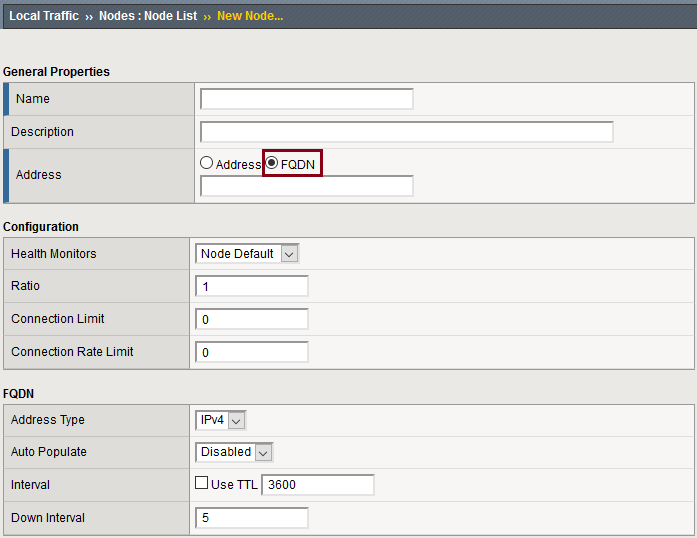
Important details about the FQDN properties
(1) Auto Populate
- Enabled
- The system generates an ephemeral node for each IP address returned in response to a DNS query for the FQDN of the node.
- Additionally, when a DNS response indicates the IP address of an ephemeral node no longer exists, the system deletes the ephemeral node.
- Disabled
- The system generates an ephemeral node for only one IP address returned in response to a DNS query for the FQDN of the node.
- Additionally, when there is a change in the IP address returned by DNS server, the system updates the ephemeral node.
(2) Interval
- Specifies the interval (in seconds) in which a query occurs, when the DNS server is up.
- The associated monitor attempts to probe three times, and marks the server down if it there is no response within 3x interval value.
- Note that instead of using an interval value, you can choose to “use TTL” (Time to Live) in the DNS response.
(3) Down Interval
- Specifies the interval (in seconds) in which a query occurs, when the DNS server is down.
- The associated monitor continues polling as long as the DNS server is down.
Nodes Configuration: Using FQDN (Auto Populate: Disabled)
There are 3 possible scenarios:
- FQDN State is “UP”, and DNS Server is reachable (Figure 1)
- Inside Node – Properties (Figure 2)
- Node List (Figure 3)
- TMSH – Node all-properties (Figure 4)
- TMSH – Ephemeral Node all-properties (Figure 5)
- TMSH – Ephemeral Node dynamic address (Figure 6)
- FQDN State is “DOWN”, and DNS Server is reachable (Figure 7)
- TMSH – Node fqdn-up-no-addr (Figure 8)
- FQDN State is “DOWN”, and DNS Server is unreachable (Figure 9)
- TMSH – Node fqdn-down (Figure 8)
Nodes Configuration: Using FQDN (Auto Populate: Enabled)
- Inside Node – Properties
- General Properties (Figure 1)
- FQDN (Figure 2)
- Node List, TMSH – Ephemeral Node List (Figure 3)
- TMSH – Node all-properties (Figure 4)
0 Comments