
Cisco ACI Upgrade The Fabric
|
Applied version
|
Cisco ACI Upgrade The Fabric
(1) High Level Steps
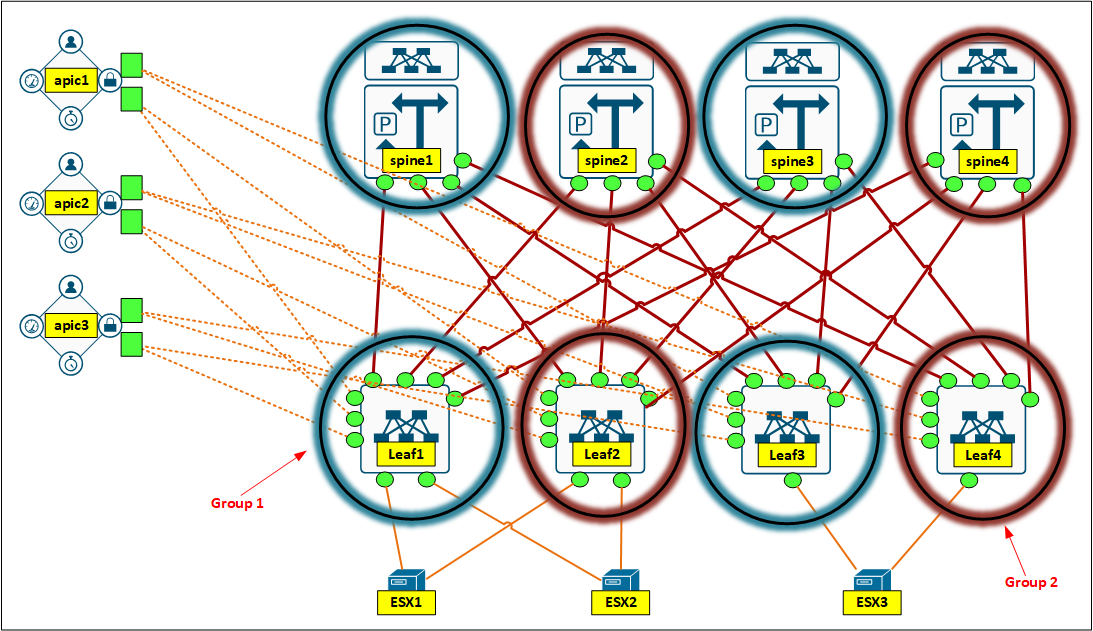
- Read the release notes (cisco.com)
- It tells you what you need to take into account
- The possible upgrade scenario, from which version to which version
- The caveats when jumping from version A to version B
- It tells you what you need to take into account
- Separate the Leaf/Spine switches into 2 groups
- Group 1
- Group 2
- Download APIC software and Leaf/Spine software to the fabric
- Verify critical hosts (ESX Servers) are dual connected
- The best if they are using port-channel
- For fabrice nodes (Leaf/Spine), there is a graceful disconnect out of the fabric, before the upgrade begins
- Upgrade APIC controllers
- Upgrade nodes in maintenance group 1
- Upgrade nodes in maintenance group 2
(2) Upgrade Example
- Download the software to the Fabric
- Verify current versions (Figure 1)
- Two softwares has been downloaded (APIC and Spine/Leaf) (Figure 2)
- Upgrade the APIC Controllers
- Schedule controller upgrade (Figure 3)
- Notice there is important warning on top (Figure 4)
- 1 Critical Faults
- 2 Major Faults
- You need to resolve the faults before proceed with the upgrade (Figure 5)
- Details about resolving these, can be found in CiscoLive session (from Mioljub Jovanovic)
- Upgrade the nodes (Leaf/Spine)
- Schedule controller upgrade (Figure 6)
- Create upgrade group 1 (Figure 7)
- Create upgrade group 2 (Figure 8)
0 Comments