
Introduction to BIG-IP LTM
|
Applied version
|
Intelligent Application Traffic Management
About LTM
BIG-IP LTM (Local Traffic Manager) helps to intelligently manages network traffic so applications are always fast, available, and secure.
- BIG-IP Local Traffic Manager enables you to control network traffic, selecting the right destination based on server performance, security, and availability.
Why LTM
- Full proxy means full power
- Because BIG-IP LTM is a full proxy, you can inspect, manage, and report on application traffic entering and exiting your network.
- From basic load balancing to complex traffic management decisions based on client, server, or application status, BIG-IP LTM gives you granular control over app traffic.
- Performance optimization
- BIG-IP LTM can optimize the speed and reliability of your applications via both network and application layers.
- Using real-time protocol and traffic management decisions based on application and server conditions, extensive connection management, and TCP and content offloading, BIG-IP LTM dramatically improves page load times.
- Blazing fast SSL
- The SSL performance of BIG-IP LTM lets you cost-effectively protect the end-to-end user experience by encrypting everything from the client to the server.
- It also scales on-demand and absorbs potentially crippling DDoS attacks.
- BIG-IP LTM includes levels of inspection necessary to block bad traffic and allow good traffic to pass through.
- TCP Optimization
- The highly optimized TCP/IP stack, TCP Express, combines TCP/IP techniques and improvements in the latest RFCs with extensions to minimize the effect of congestion and packet loss and recovery.
- Independent testing tools and customer experiences show TCP Express delivers up to a 2x performance gain for users and a 4x increase in bandwidth efficiency.
- Scale and Speed
- With BIG-IP LTM, you get a sophisticated, enterprise-class load balancer.
- You also get granular layer 7 control, SSL offloading and acceleration capabilities, and ScaleN technology that delivers on-demand scaling.
- Programmability
- BIG-IP LTM is programmable, so you can take the visibility and control it provides and immediately act on it using iRules, F5’s event-driven scripting language.
- From defeating zero-day attacks to cloning specific app requests or dealing with custom application protocols, iRules let you adapt to application delivery challenges across any environment.
LTM Essential
Essential component of the BIG-IP LTM system are virtual servers, pool, pool members, and nodes.
- Virtual server receives incoming traffic, and intelligently distribute the traffic to the best available pool members
- This intelligent is achieved by actively monitor the health and performance of pool members
- This traffic distribution is normally done via connection distribution
- Sometimes referred to as “Connection-Based Load Balancing (CBLB)”
- For certain cases traffic distribution need to be done via “Message-Based Load Balancing (MBLB)
- Depending on application requirement, LTM might need to maintain the persistency of traffic distribution based on certain factor (i.e. IP address, cookie, etc)
Connection-Based Load Balancing (CBLB)
CBLB is the default behavior, and simply means BIG-IP LTM will distribute the connections to the pool members using its configured algorithm method.
BIG-IP LTM supports several load balancing methods, examples: Round Robin, Ratio (member), Least Connections (member), etc.
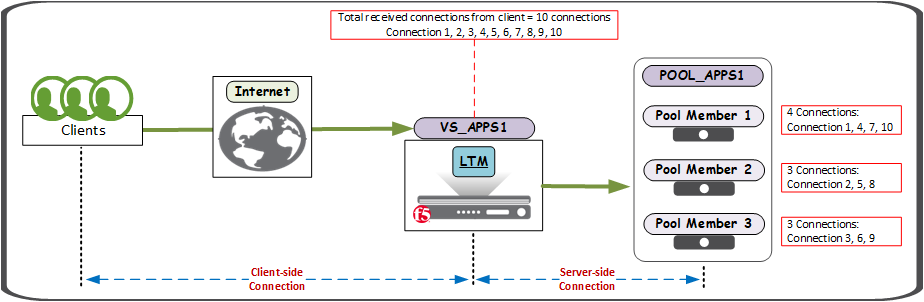
Example: Round Robin Method
Configuration example:
- Virtual Server: VS_APPS1, 200.123.123.123, TCP/443
- Pool: POOL_APPS1, LBMethod: Round Robin, Monitor: TCP
- Pool Member 1: NODE_APPS1 port 443
- 192.168.123.11
- Pool Member 2: NODE_APPS2 port 443
- 192.168.123.12
- Pool Member 3: NODE_APPS2 port 443
- 192.168.123.13
- Pool Member 1: NODE_APPS1 port 443
It is a Full Proxy Architecture, it maintain separate connections between client-side connection and server-side connection, for example:
- Client-side: Client 27.123.200.123:52616 connect to BIG-IP VS 200.123.123.123:443
- Server-side: BIG-IP System 27.123.200.123:52616 connect to Back-end Server 192.168.123.11:443
*Round Robin: Whenever VS_APPS1 receives incoming traffic from client, it will passes each new connection request to the next server in line, eventually distributing connections evenly across the array of pool members being load balanced.
About the “Network Map”
The BIG-IP GUI (Configuration Utility) includes a feature known as the Network Map.
The Network Map provides a hierarchical, visual view of BIG-IP LTM components (virtual servers, pools, and pool members, iRules), their relationships, and respective statuses on the BIG-IP system.
The Network Map also provides additional component information on accompanying panels on the page.
View the network map
You perform this task to view the hierarchical relationship of local traffic objects to each virtual server on the BIG-IP system.
- On the Main tab, click “Local Traffic ›› Network Map”.
- Network Map (Figure 1)
- Network Map Filter (Figure 2)
- Expanded Network Map
- STATS view (Figure 3)
- DIAGRAM view (Figure 4)
0 Comments