
Introduction to BIG-IP LTM: Virtual Servers
|
Applied version
|
Introduction to LTM Virtual Servers
About Virtual Servers
A VS (Virtual Server) represent application service that is being proxied (fronted) by BIG-IP system.
In the text book definition, a VS is a traffic-management object on the BIG-IP system that is represented by a virtual IP address and a service, such as 200.123.123.123:443.
- When clients on an external network send application traffic to virtual server
- The virtual server listens for that traffic and, through destination address translation
- Directs the traffic according to the way that you configured the settings on the virtual server
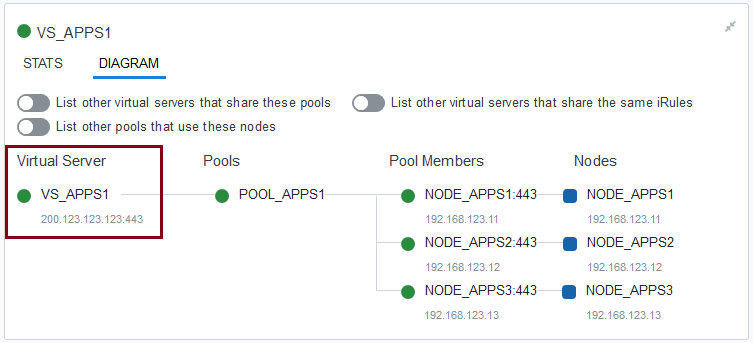
A primary purpose of a virtual server is to distribute traffic across a pool of servers that you specify in the virtual server configuration.
- You can assign profiles to a VS to customize the way that the BIG-IP system processes various types of traffic. Example:
- Enable HTTP compression
- Decrypt, re-encrypt, and verify SSL connections
- When you create a VS, you specify the pool(s) that you want to use as the ultimate destination for any traffic coming from the clients
- You also configure its general properties, profiles, SNATs, and other resources you want to assign to it, such as iRules or session persistence types
In most cases, it’s important to ensure the response from application traffic returns through the BIG-IP system.
There are 2 options to ensure:
- Route the return traffic to point to BIG-IP self IP address, depending on your network environment:
- Route can be done inside the application server itself (normally as default route)
- Route can be done on the gateway of application server
- Or you can create a SNAT and assign it to a virtual server
- You also need to make sure that the SNAT address is being routed to BIG-IP self IP address
Types of Virtual Servers
The BIG-IP virtual server type specifies:
- Set of attributes that available for a virtual server
- The TCP connection setup behavior
Types of virtual servers:
- Standard
- Directs client traffic to a load balancing pool and is the most basic type of virtual server
- *A.k.a “Load balancing VS”
- It implements a full proxy architecture that support full protocol stack (L3-L7)
- It support the most complete application service features
- Directs client traffic to a load balancing pool and is the most basic type of virtual server
- Forwarding (IP)
- Like a Forwarding (Layer 2) VS, has no pool members to load balance.
- The virtual server destination address can be either a node address or a network address
- *This type of virtual server has no pool members to load balance
- *The virtual server simply forwards a packet directly to the configured destination IP address, based on what’s defined in the BIG-IP system’s routing table
- With a forwarding (IP) virtual server, address translation is disabled
- *An example of a Forwarding (IP) virtual server is one that accepts all traffic on an external VLAN and forwards it to the virtual server destination IP address
- Performance (Layer 4)
- VS which you associate a Fast L4 profile
- Together, the virtual server and profile increase the speed at which the virtual server processes Layer 4 requests
- Forwarding (Layer 2)
- VS shares the same IP address as a node in an associated VLAN
- *This type of virtual server has no pool members to load balance
- To configure this type of virtual server, you must perform some additional configuration tasks:
- *Creating a VLAN group that includes the VLAN in which the node resides
- *Assigning a self-IP address to the VLAN group, and disabling the virtual server on the relevant VLAN
- When you use a Forwarding (Layer 2) type of virtual server, the BIG-IP system preserves the source MAC address in the header.
- VS shares the same IP address as a node in an associated VLAN
- Performance (HTTP)
- VS which you associate a Fast HTTP profile
- Together, the virtual server and profile increase the speed at which the virtual server processes HTTP requests
- Stateless
- Prevents the BIG-IP system from putting connections into the connection table for wildcard and forwarding destination IP addresses
- When creating a stateless VS
- *Cannot configure SNAT automap, iRules, or port translation
- *Must configure a default load balancing pool
- Note that this type of virtual server applies to UDP traffic only
- Reject
- VS specifies that the BIG-IP system rejects any traffic destined to this VS IP address
- DHCP
- VS relays DHCP messages between clients and servers residing on different IP networks
- Known as a DHCP relay agent, a BIG-IP system with a DHCP type of virtual server listens for DHCP client messages being broadcast on the subnet and then relays those messages to the DHCP server
- The DHCP server then uses the BIG-IP system to send the responses back to the DHCP client.
- Configuring a DHCP virtual server on the BIG-IP system relieves you of the tasks of installing and running a separate DHCP server on each subnet.
- Internal
- VS is one that can send traffic to an intermediary server for specialized processing before the standard virtual server sends the traffic to its final destination. For example, if you want the BIG-IP system to perform content adaptation on HTTP requests or responses, you can create an internal virtual server that load balances those requests or responses to a pool of ICAP servers before sending the traffic back to the standard virtual server. An internal virtual server supports both TCP and UDP traffic.
- Message Routing
- VS is available for peer-to-peer configurations
- Examples of traffic flows that can benefit from this type of virtual server are traffic flows using Diameter and SIP protocols
VS Configuration
You perform this task to create a VS on the BIG-IP system.
- On the Main tab, click “Local Traffic ›› Virtual Servers: Virtual Server List ›› Create”.
- Create new VS
- General Properties (Figure 1)
- Configuration Basic (Figure 2, 3), Configuration Advanced (Figure 4,5,6,7,8)
- Content Rewrite, Acceleration (Figure 9)
- Resources (Figure 10)
- Virtual Server List, Virtual Address List (Figure 11)
- Inside Virtual Server
- VS Properties (Figure 12)
- VS Resources (Figure 13)
- Inside Virtual Address (Figure 14)
- The Statistics
- Virtual Servers Statistics (Figure 15)
- Virtual Address Statistics (Figure 16)
0 Comments