
BIG-IP DNS Integration With iQuery
Overall Network Topology (Figure 1)

F5 iQuery Protocol Overview
iQuery is an F5 Networks protocol
- To collects configuration and metric information and exchanges that information
- Connection is between BIG-IP DNS (gtmd process) and any BIG-IP products running the big3d agent (including BIG-IP DNS itself)
- iQuery runs on top of SSL/TLS connection via TCP port 4353
F5 iQuery Certificate(s) Overview
Device Certificate

The device certificate must include EKU (Extended Key Usage) for both the clientAuth (client authentication) and serverAuth (server authentication) extensions
- To allow iQuery to use the certificate for both SSL server and SSL client authentication.
- The big3d process operates as a server (serverAuth), while the gtmd process operates as a client (clientAuth).
- BIG-IP DNS uses both (big3d) serverAuth and (gtmd) clientAuth
- Non BIG-IP DNS only uses (big3d) serverAuth
- openssl x509 -noout -purpose -in /var/tmp/example.crt | grep -iE ‘client|server’
- SSL client : Yes
- SSL server : Yes
Trusted Certificates Store

To establish iQuery trust between BIG-IP devices, we need to import the (remote peers) certificate’s issuer (signer) in this folder
- For CA-signed certificate
- > Import Root CA certificate
- > (If any) Import Intermediate CA certificate(s)
- > (optional) Import device certificate itself
- For self-signed certificate
- > Import device certificate itself
- > Because the issuer is self certificate
iQuery Integration: DNS205 With LTM201 (Figure2)
iQuery High-Level Requirements
- DNS205 (gtmd) establish iQuery connection to itself (big3d – SSL/TCP-4353)
- DNS205 (gtmd) establish iQuery connection to LTM201 (big3d – SSL/TCP-4353)
- Established iQuery SSL trust between iQuery devices (refer to below section – iQuery Authentication)
GTM Overall Configuration
- DNS ›› Settings : GSLB : General
- modify gtm global-settings general synchronization-group-name GTM_HOME_NET
- modify gtm global-settings general synchronization yes
- DNS ›› GSLB : Data Centers : Data Center List
- create gtm datacenter DC_US location “United States”
- DNS ›› GSLB : Servers : Server List
- Default value: product bigip monitor bigip virtual-server-discovery disabled
- create gtm server DNS205_206 datacenter DC_US devices add { DNS205 { addresses add { 100.0.0.205 } } }
- create gtm server LTM201_202 datacenter DC_US virtual-server-discovery enabled devices add { LTM201 { addresses add { 100.0.0.201 } } }
- System ›› Certificate Management : Device Certificate Management : Device Certificate
- CN: gtm201.home.net (Issuer: TrustMe Intermediate CA L1M)
- TrustMe Intermediate CA L1M (Issuer: TrustMe Root CA)
- TrustMe Root CA (Issuer: Self)
LTM Overall Configuration
- System ›› Certificate Management : Device Certificate Management : Device Certificate
- CN: ltm201.home.net (Issuer: TrustMe Intermediate CA L1M)
- TrustMe Intermediate CA L1M (Issuer: TrustMe Root CA)
- TrustMe Root CA (Issuer: Self)
iQuery Connection and Authentication
iQuery SSL handshake messages (Figure 3)
- BIG-IP DNS205 (gtmd) ––SSL over TCP-4353–> BIG-IP DNS205 (big3d) <– Internal connection
- BIG-IP DNS205 (gtmd) ––SSL over TCP-4353–> BIG-IP LTM201 (big3d)
- LTM201 send its Device Certificate plus CA Certicates (if any) for SSL server authentication
- DNS205 send its Device Certiticate for SSL client authentication
iQuery connections (Figure 4)
- View from Linux connection table
- View from TMOS connection table
iQuery authentication (Figure 5)
- LTM201 send its device certificate
- Certificate(s)
- LTM201 device certificate
- Its local CA certificate(s), if exist in “Device Trust Certificates” store
- DNS205 authenticate LTM201 certificate(s), check against its “Trusted Server Certificates” store
- Certificate(s)
- DNS205 send its device certificate
- Certificate
- LTM201 authenticate DNS205 certificate, check against its “Device Trust Certificates” store
Authenticated iQuery configuration
- Mandatory (Minimum Configuration): good for troubleshooting knowledge (Figure 6)
- Optional (Maximum Configuration): good for deployment practice (Figure 7)
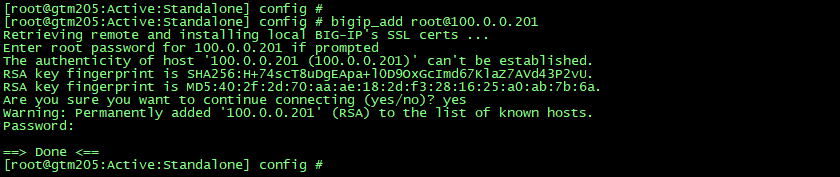
The Use of “bigip_add” script (Figure 8)
To establish the iQuery SSL trust, instead of import manually, we can utilise the bigip_add script to exchange SSL certificates between BIG-IP DNS with remote BIG-IP peer(s)
BIG-IP DNS –> BIG-IP LTM (SSH over TCP-22)
- Run this script on the local BIG-IP DNS device to add remote peer BIG-IP device
- If the remote peer account has advanced shell (bash) access
- #bigip_add <remote_peer_IP_address>
- #bigip_add <username>@<remote_peer_IP_address>
- If the remote peer account has administrator role with tmsh access only (useful to add remote peer in Appliance mode)
- #bigip_add -a <remote_peer_IP_address>
- #bigip_add -a <username>@<remote_peer_IP_address>
- Run above commands from tmsh
- #tmsh run gtm gtm_add <…>
- Password = password of remote peer account
- If the remote peer account has advanced shell (bash) access
- The script requires to establish SSH trust
- Accept SSH-RSA key of remote peer and add to SSH known hosts (/var/ssh/root/known_hosts)
- Appends the local BIG-IP DNS device certificate to remote BIG-IP peer Trusted Device Certificates store
- Append local “/config/httpd/conf/ssl.crt/server.crt” to remote peer “/config/big3d/client.crt”
- Appends the remote BIG-IP peer device certificate to local BIG-IP DNS Trusted Server Certificates store
- Append local “/config/httpd/conf/ssl.crt/server.crt” to remote peer “/config/gtm/server.crt”
Device Certificate Caveats
For CA-signed device certificate, to support the use of “bigip_add” script
- You must include any chain and root certificates in the /config/httpd/conf/ssl.crt/server.crt file
- Applicable for BIG-IP DNS devices and non BIG-IP DNS devices
- This is to facilitate the certificate exchange performed by the script, so it is able to get all the required certificates from this file (server.crt)
- Otherwise, use manual certificate import yourself
- Make sure the device certificate is on top, and append any chain and root certificate below.
- cat <CA_cert_name>.crt >> server.crt
- For BIG-IP DNS device, when you update the device certificate via Web UI
- The local Device Trust Certificates and Trusted Server Certificates stores are automatically updated/appended with the renewed or replaced device certificate (including appended CA certificates)
- However, you must manually update the trusted certificate stores on remote iQuery peers
- Trusted Server Certificates store is synced across BIG-IP DNS devices inside GSLB sync group
- For non BIG-IP DNS device, updating the device certificate won’t trigger automatically update on the Device Trust Certificates
Device Certificate Chain Caveats
“bigip_add” script couldn’t consume the CA certificates from “Device Certificate Chain” store
- System ›› Certificate Management : Device Certificate Management : Device Certificate Chain ›› chain.crt
- /config/httpd/conf/ssl.crt/chain.crt
- You need to combine the CA certificates with device certificate in a single file “server.crt”, see above
- This store is meant to be consumed by httpd (Web UI), to configure httpd to consume CA certificates from “server.crt”
- tmsh modify /sys httpd ssl-certchainfile /config/httpd/conf/ssl.crt/server.crt
- tmsh restart /sys service httpd
- becareful on modifying httpd config through tmsh, make sure that the file naming is identical on all the members of sync-failover device group
- It may trigger a config-sync failure event with an error message (/var/log/ltm): SSLCertificateFile: file ‘/config/httpd/conf/ssl.crt/<certificate_name>.crt’ does not exist or is empty.
0 Comments