
IPsec VPN With DVTI-EEzVPN Example
|
Applied version
|
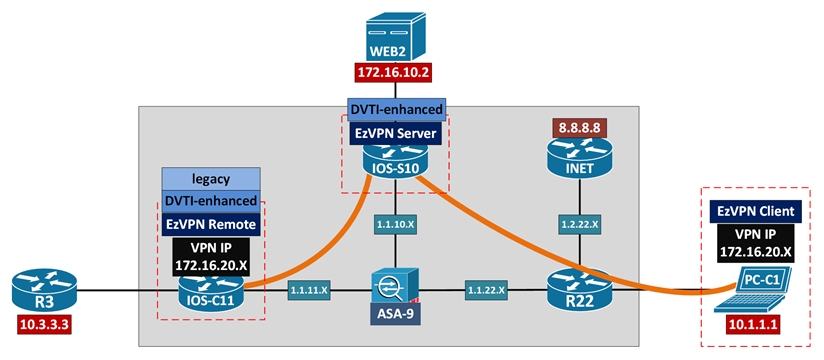
Configuration & Verification – EzVPN Remote
| !! IOS-S10 EzVPN Server !! v15.6(2)T | !! IOS-C11 EzVPN Remote !! v15.5(2)T |
|
! IP Routing between underlay [IOS-S10] to [IOS-C11], 1.1.10.10 to 1.1.11.11 [IOS-S10] to [R22], 1.1.10.10 to 1.1.22.22
! Crypto ACL / Split Tunneling Inclusion access-list 199 permit ip 172.16.10.0 0.0.0.255 any
! X-AUTH aaa new-model aaa authentication login EZVPN_AAA local aaa authorization network EZVPN_AAA local username user1 password cisco1
! ISAKMP/IKE Phase 1 security parameters crypto isakmp policy 10 hash md5 authentication pre-share group 2 encryption 3des
! Crypto client VPN IP pool ip local pool EZVPN_POOL1 172.16.20.100 172.16.20.200
! Crypto ISAKMP client group crypto isakmp client configuration group EZVPN_GROUP1 key ISAKMP_KEY_G1 dns 8.8.8.8 domain docisco.com pool EZVPN_POOL1 acl 199
! ISAKMP/IKE Phase 2 security parameters crypto ipsec transform-set XF esp-3des esp-sha-hmac
! Crypto isakmp profile crypto isakmp profile ISAKMP_PROF_G1 match identity group EZVPN_GROUP1 client authentication list EZVPN_AAA isakmp authorization list EZVPN_AAA client configuration address respond virtual-template 1
! Crypto ipsec profile crypto ipsec profile IPSEC_PROF_G1 set transform-set XF
! Apply crypto profile interface Loopback 10 ip address 10.10.10.10 255.255.255.255 //doesn’t need to be routable
interface Virtual-Template1 type tunnel ip unnumbered Loopback10 tunnel mode ipsec ipv4 tunnel protection ipsec profile IPSEC_PROF_G1
|
! IP Routing between underlay [IOS-C11] to [IOS-S10], 1.1.11.11 to 1.1.10.10
Using legacy EzVPN Remote ! EzVPN client connection profile crypto ipsec client ezvpn EZVPN_REMOTE group EZVPN_GROUP1 key ISAKMP_KEY_G1 mode client connect auto username user1 password cisco1 xauth userid mode local peer 1.1.10.10
! Apply EzVPN client connection profile interface Ethernet0/1 description ##To R3 (Client)## crypto ipsec client ezvpn EZVPN_REMOTE inside
interface Ethernet0/0 description ##To IOS-S10 (VPN Server)## crypto ipsec client ezvpn EZVPN_REMOTE outside
Using enhanced EzVPN Remote ! VTI configuration interface Loopback11 ip address 11.11.11.11 255.255.255.255 //doesn’t need to be routable
interface Virtual-Template1 type tunnel ip unnumbered lo11 tunnel mode ipsec ipv4
! EzVPN client connection profile crypto ipsec client ezvpn EZVPN_REMOTE group EZVPN_GROUP1 key ISAKMP_KEY_G1 mode client connect auto username user1 password cisco1 xauth userid mode local peer 1.1.10.10 virtual-interface 1
! Apply EzVPN client connection profile interface Ethernet0/1 description ##To R3 (Client)## crypto ipsec client ezvpn EZVPN_REMOTE inside
interface Ethernet0/0 description ##To IOS-S10 (VPN Server)## crypto ipsec client ezvpn EZVPN_REMOTE outside
[Connectivity]
[R3] to [WEB2], 10.3.3.3 to 172.16.10.2 [IOS-C11] PAT/NAT 10.3.3.3 into 172.16.20.106/172.16.20.107 ping ICMP-echo-request [OK] Telnet TCP port 80 [OK] |
Configuration & Verification – EzVPN Client
| !! IOS-S10 EzVPN Server !! v15.6(2)T | !! PC-C1 Cisco VPN Client !! v5.0.07.0410 |
|
! Crypto ISAKMP client group crypto isakmp client configuration group EZVPN_GROUP2 key ISAKMP_KEY_G2 dns 8.8.8.8 domain docisco.com pool EZVPN_POOL1 acl 199
! Crypto isakmp profile crypto isakmp profile ISAKMP_PROF_G2 match identity group EZVPN_GROUP2 client authentication list EZVPN_AAA isakmp authorization list EZVPN_AAA client configuration address respond virtual-template 2
! Per-group ACL ip access-list extended DENY_PING_ONLY deny icmp any any permit ip any any
! Apply crypto profile interface Virtual-Template2 type tunnel ip unnumbered Loopback10 tunnel mode ipsec ipv4 tunnel protection ipsec profile IPSEC_PROF_G1 ip access-group DENY_PING_ONLY in |
! Routing [PC-C1] default route to [R22] [R22] NAT 10.1.1.1 into 1.1.22.22 [R22] to [IOS-S10], 1.1.22.22 to 1.1.10.10
! VPN Client connection profile Connection Entry: IOS-S10-G2 Description: IOS-S10 EzVPN Group2 Host: 1.1.10.10
Group Authentication Name: EZVPN_GROUP2 Password: ISAKMP_KEY_G2
Transport Enable Transparent Tunneling: IPSec over UDP (NAT/PAT)
[Connectivity] [PC-C1] to [WEB2], 172.16.20.105 to 172.16.10.2 ping ICMP-echo-request [NOK] Telnet TCP port 80 [OK]
IOS-S10#show ip interface virtual-access1 Inbound access list is DENY_PING_ONLY
|
0 Comments