
IPsec VPN Hub And Spoke Aggressive Mode
|
Applied version
|
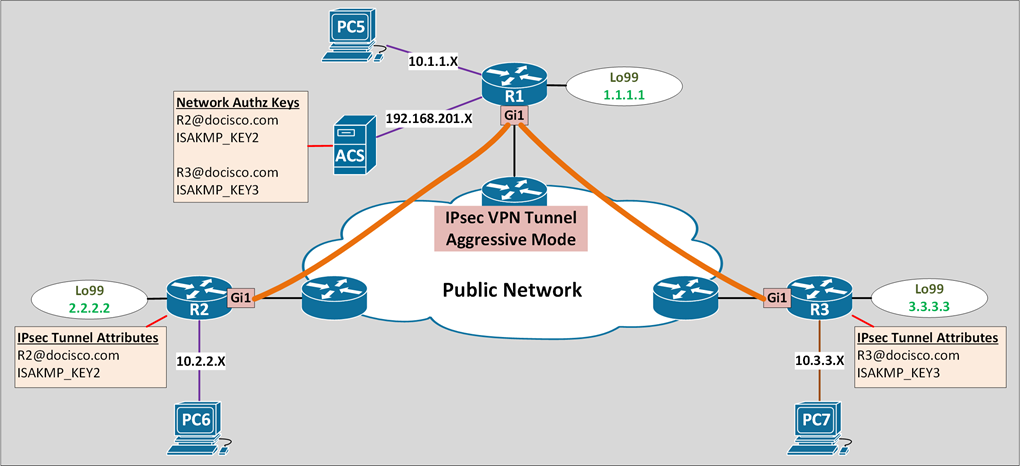
IKE initiate Aggressive mode
- Allow to specify RADIUS tunnel attributes for an IPsec peer
- Initiate IKE aggressive mode negotiation with the tunnel attributes
- Best implemented in a crypto hub & spoke scenario
- Spokes initiate IKE aggressive mode with the tunnel attributes
- Hub verify the tunnel attributes using external AAA server
- This is to improve scalability & security
- The preshared keys are kept at a central repository (AAA server)
- Aggressive mode is fast and requires less process
Hub & Spoke Aggressive mode consideration
- Restriction
- TED can’t be used (intended for full mesh setup)
- Hub can’t initiate the communication first
- There is no direct client to client communications
- RADIUS tunnel attributes
- Tunnel-Client-Endpoint (AV-66): client identification (IPv4/email/FQDN)
- Tunnel-Password (AV-69): used as preshared key
- RADIUS user profile example
- user@cisco.com Password = “cisco”, Service-Type = Outbound
- Tunnel-Medium-Type = :1:IP
- Tunnel-Type = :1:ESP
- Cisco:Avpair = “ipsec:tunnel-password=cisco123”
- Cisco:Avpair = “ipsec:key-exchange=ike”
AAA Server (Cisco ACS) Configuration
| !! ACS !! AAA Server |
|
! Authentication Profile Username · R2@docisco.com · R3@docisco.com Password · <Not Significant> Options · If authentication failed: continue · If user not found: reject · If process failed: drop
! Authorization Profile R2@docisco.com · Tunnel-Medium-Type “[T:1] IPv4” · Tunnel-Type “[T:1] ESP” · Cisco-av-pair “ipsec:key-exchange=ike” · Cisco-av-pair “ipsec:tunnel-password=ISAKMP_KEY2” R3@docisco.com · Tunnel-Medium-Type “[T:1] IPv4” · Tunnel-Type “[T:1] ESP” · Cisco-av-pair “ipsec:key-exchange=ike” · Cisco-av-pair “ipsec:tunnel-password=ISAKMP_KEY3” |
Router Configuration & Verification
| !! R1 !! HUB | !! R2 !! SPOKE |
|
! Crypto endpoint authentication radius-server host 192.168.201.58 radius-server key RAD_KEY ip radius source-interface GigabitEthernet3 aaa new-model aaa authorization network IKE_AUTH group radius
! ISAKMP/IKE Phase 1 security parameters crypto isakmp policy 10 encryption des hash md5 authentication pre-share group 2
! ISAKMP/IKE Phase 2 security parameters crypto ipsec transform-set IPSEC_XFORM esp-des esp-md5-hmac mode tunnel
! Crypto map parameters crypto dynamic-map DMAP1 10 set transform-set IPSEC_XFORM set pfs group2 crypto map MAP1 10 ipsec-isakmp dynamic DMAP1 crypto map MAP1 isakmp authorization list IKE_AUTH
! Crypto map source address crypto map MAP1 local-address Loopback99
! Apply crypto map interface GigabitEthernet1 crypto map MAP1
|
! Crypto endpoint authentication crypto isakmp peer address 1.1.1.1 set aggressive-mode password ISAKMP_KEY2 set aggressive-mode client-endpoint user-fqdn R2@docisco.com
! Proxy ACL ip access-list extended ADDR21 permit ip 10.2.2.0 0.0.0.255 10.1.1.0 0.0.0.255
! ISAKMP/IKE Phase 1 security parameters crypto isakmp policy 10 encryption des hash md5 authentication pre-share group 2
! ISAKMP/IKE Phase 2 security parameters crypto ipsec transform-set IPSEC_XFORM esp-des esp-md5-hmac mode tunnel
! Crypto map parameters crypto map MAP1 10 ipsec-isakmp set peer 1.1.1.1 set transform-set IPSEC_XFORM match address ADDR21 set pfs group2
! Crypto map source address crypto map MAP1 local-address Loopback99
! Apply crypto map interface GigabitEthernet1 crypto map MAP1 |
|
|
! Ping R2#ping 1.1.1.1 source loopback99
Sending 5, 100-byte ICMP Echos to 1.1.1.1, Packet sent with a source address of 2.2.2.2 !!!!! Success rate is 100 percent (5/5)
|
|
! Debug R1#debug aaa authorization R1#debug crypto isakmp R1#debug radius
AAA/AUTHOR: Pick method list ‘IKE_AUTH’ RADIUS: Send Access-Request to 192.168.201.58:1645 RADIUS: Received 192.168.201.58:1645, Access-Accept ISAKMP: Input = IKE_MESG_FROM_AAA, PRESHARED_KEY_REPLY ISAKMP: Old State = IKE_R_AM2 New State = IKE_P1_COMPLETE ISAKMP: Old State = IKE_QM_R_QM2 New State = IKE_QM_PHASE2_COMPLETE
|
! ISAKMP SA R2#show crypto isakmp sa
dst src state conn-id status 1.1.1.1 2.2.2.2 QM_IDLE 1001 ACTIVE
! IPsec SA R2#show crypto ipsec sa
interface: GigabitEthernet1 Crypto map tag: MAP1, local addr 2.2.2.2 local ident (addr/mask/prot/port): (10.2.2.0/255.255.255.0/0/0) remote ident (addr/mask/prot/port): (10.1.1.0/255.255.255.0/0/0) current_peer 1.1.1.1 port 500 #pkts encaps: 4, #pkts encrypt: 4, #pkts digest: 4 #pkts decaps: 4, #pkts decrypt: 4, #pkts verify: 4
inbound esp sas: spi: 0xB3751CD5(3010796757) in use settings ={Tunnel, } Status: ACTIVE(ACTIVE)
outbound esp sas: spi: 0xFCF9CD7F(4244229503) in use settings ={Tunnel, } Status: ACTIVE(ACTIVE) |
0 Comments