
IOS EzVPN Server With Cisco VPN Client
|
Applied version
|
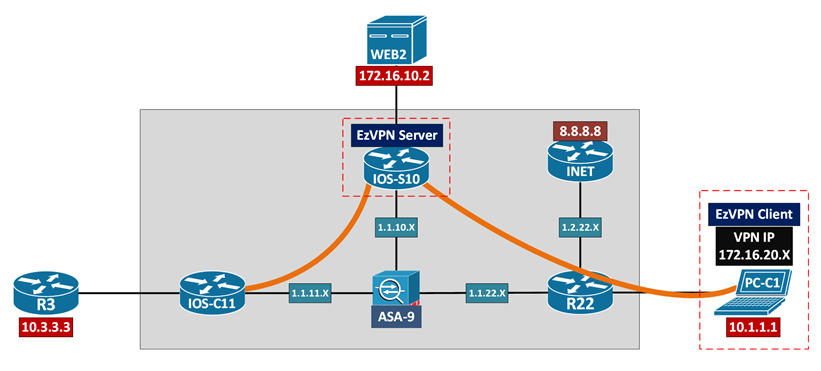
Configuration & Verification
| !! IOS-S10 EzVPN Server !! v15.2(4)S7 | !! PC-C1 Cisco VPN Client !! v5.0.07.0410 |
|
! IP Routing between underlay [IOS-S10] to [R22], 1.1.10.10 to 1.1.22.22
! Crypto ACL / Split Tunneling Inclusion access-list 199 permit ip 172.16.10.0 0.0.0.255 any
! X-AUTH aaa new-model aaa authentication login EZVPN_AAA local aaa authorization network EZVPN_AAA local username user1 password cisco1
! ISAKMP/IKE Phase 1 security parameters crypto isakmp policy 10 hash md5 authentication pre-share group 2 encryption 3des
! Crypto client VPN IP pool ip local pool EZVPN_POOL1 172.16.20.100 172.16.20.200
! Crypto ISAKMP client group //Mode-Config crypto isakmp client configuration group EZVPN_GROUP1 key ISAKMP_KEY_G1 dns 8.8.8.8 domain docisco.com pool EZVPN_POOL1 acl 199
! ISAKMP/IKE Phase 2 security parameters crypto ipsec transform-set XF esp-3des esp-sha-hmac
! Crypto map parameters and binding crypto dynamic-map DYNAMIC_MAP 1 set transform-set XF reverse-route
crypto map STATIC_MAP client authentication list EZVPN_AAA crypto map STATIC_MAP isakmp authorization list EZVPN_AAA crypto map STATIC_MAP client configuration address respond crypto map STATIC_MAP 1 ipsec-isakmp dynamic DYNAMIC_MAP
! Apply crypto profile interface Fa0/0 crypto map STATIC_MAP
|
! IP Routing between underlay [PC-C1] default route to [R22] [R22] NAT 10.1.1.1 into 1.1.22.22 [R22] to [IOS-S10], 1.1.22.22 to 1.1.10.10
! VPN Client connection profile Connection Entry: IOS-S10 Description: IOS-S10 EzVPN Host: 1.1.10.10
Group Authentication Name: EZVPN_GROUP1 Password: ISAKMP_KEY_G1
Transport Enable Transparent Tunneling: IPSec over UDP (NAT/PAT)
! Cisco VPN Client connect to IOS-S10 Phase 1 IOS-S10# ISAKMP:(1005):Old State = IKE_R_AM2 New State = IKE_P1_COMPLETE
Phase 1.5 IOS-S10# ISAKMP:(1005):Need XAUTH ISAKMP/xauth: request attribute XAUTH_USER_NAME_V2 ISAKMP/xauth: request attribute XAUTH_USER_PASSWORD_V2 ISAKMP:(1005):Input = IKE_MESG_INTERNAL, IKE_PHASE1_COMPLETE ISAKMP:(1005):Old State = IKE_P1_COMPLETE New State = IKE_XAUTH_REQ_SENT
! Cisco VPN Client send user credential IOS-S10# ISAKMP:(1005):deleting node -1349077011 error FALSE reason “Done with xauth request/reply exchange”
ISAKMP:(1005):attributes sent in message: Address: 0.2.0.0 ISAKMP:(1005):allocating address 172.16.20.103 ISAKMP: Sending private address: 172.16.20.103 ISAKMP: Sending IP4_DNS server address: 8.8.8.8 ISAKMP: Sending ADDRESS_EXPIRY seconds left to use the address: 86378 ISAKMP: Sending save password reply value 0 ISAKMP: Sending DEFAULT_DOMAIN default domain name: docisco.com ISAKMP: Sending split include name 199 network 172.16.10.0 mask 255.255.255.0 protocol 0, src port 0, dst port 0
Phase 2 IOS-S10# ISAKMP:(1005):Old State = IKE_QM_R_QM2 New State = IKE_QM_PHASE2_COMPLETE
! DPD check from Cisco VPN Client to IOS-S10 IOS-S10# DPD/R_U_THERE received from peer 1.1.22.22 ISAKMP:(1005):Sending NOTIFY DPD/R_U_THERE_ACK protocol 1
|
|
! Routing via RRI IOS-S10#show ip route 172.16.20.103 S 172.16.20.103/32 [1/0] via 1.1.22.22
! IPsec VPN session IOS-S10#show crypto session detail Interface: FastEthernet0/0 Username: user1 Group: EZVPN_GROUP1 Assigned address: 172.16.20.103 Uptime: 00:01:15 Session status: UP-ACTIVE Peer: 1.1.22.22 port 49360 fvrf: (none) ivrf: (none) Phase1_id: EZVPN_GROUP1 Desc: (none) IKEv1 SA: local 1.1.10.10/4500 remote 1.1.22.22/49360 Active Capabilities:CXN connid:1005 lifetime:23:58:22 IPSEC FLOW: permit ip 0.0.0.0/0.0.0.0 host 172.16.20.103 Active SAs: 2, origin: dynamic crypto map Inbound: #pkts dec’ed 0 drop 0 life (KB/Sec) 4608000/3524 Outbound: #pkts enc’ed 0 drop 0 life (KB/Sec) 4608000/3524
[Connectivity] [WEB2] ping to [PC-C1], 172.16.10.2 to 172.16.20.103 [OK]
|
! Windows Routing Table 0.0.0.0/0 10.1.1.22 LAN1
172.16.0.0/16 On-link VPN_Adapter 172.16.10.0/24 172.16.0.1 172.16.20.103/32 On-link VPN_Adapter 172.16.255.255/32 On-link VPN_Adapter
! VPN Client > Status > Statistics [Tunnel Details] Address Information Client: 172.16.20.103 Server: 1.1.10.10
Crypto Encryption: 168-bit 3-DES Authentication: HMAC-SHA1
Transport Transparent Tunneling: Active on UDP port 4500
[Route Details] Secured Routes 172.16.10.0/24
[Connectivity] [PC-C1] ping to [WEB2], 172.16.20.103 to 172.16.10.2 [OK] [PC-C1] ping to [INET], 10.1.1.1 to 8.8.8.8 [OK] |
|
! Disabling split tunneling key ISAKMP_KEY_G1 no acl 199
|
! Windows Routing Table 0.0.0.0/0 172.16.0.1 172.16.0.0/16 On-link VPN_Adapter 172.16.20.103/32 On-link VPN_Adapter 172.16.255.255/32 On-link VPN_Adapter
[Route Details] Secured Routes 0.0.0.0/0
[Connectivity] [PC-C1] to [WEB2], 172.16.20.103 to 172.16.10.2 [OK] [PC-C1] to [INET], 172.16.20.103 to 8.8.8.8 [NOK] //route add 8.8.8.8/32 10.1.1.22 LAN1 won’t help |
0 Comments